Rushdown Presents: An Open Source Tool for Improving The Godot Developer Experience


Hello friends! Today, we’re very excited to share something cool we’ve been working on. Every year, Rushdown (the studio whose blog you’re reading!) does a 3 day hackathon - the Rush-a-thon. One of the projects made for this year’s Rush-a-thon was a Multiplayer Toolkit for the Godot Game Engine. The project made it easy to bootstrap a new Godot multiplayer game and get it deployed fast. But the Multiplayer Toolkit isn’t what we’re here to talk about today.
While working on the Multiplayer Toolkit, we noticed we were writing a lot of scripts. Scripts to build, scripts to provision, and scripts to deploy. We thought - “wouldn’t it be nice if you could run these scripts from inside of Godot?” and found ourselves pivoting.
So, in addition to some very cool multiplayer tooling, we built a Godot plugin to run scripts in the editor. We call it the “Godot Task Runner”. It's the kind of obvious utility that feels like it should already exist, but doesn't.
The rest of the team thought the Task Runner was pretty cool too, so we carved out a few more weeks to polish up the Task Runner. We added support for more platforms, cleaned up the UI, fixed a lot of bugs, and wrote just a bit of documentation. Now, we’re releasing the Task Runner as an open source project.
If that sounds interesting to you, you can install the Godot Task Runner from GitHub or the Asset Library.
 Rushdown-Studios

But what does it do?
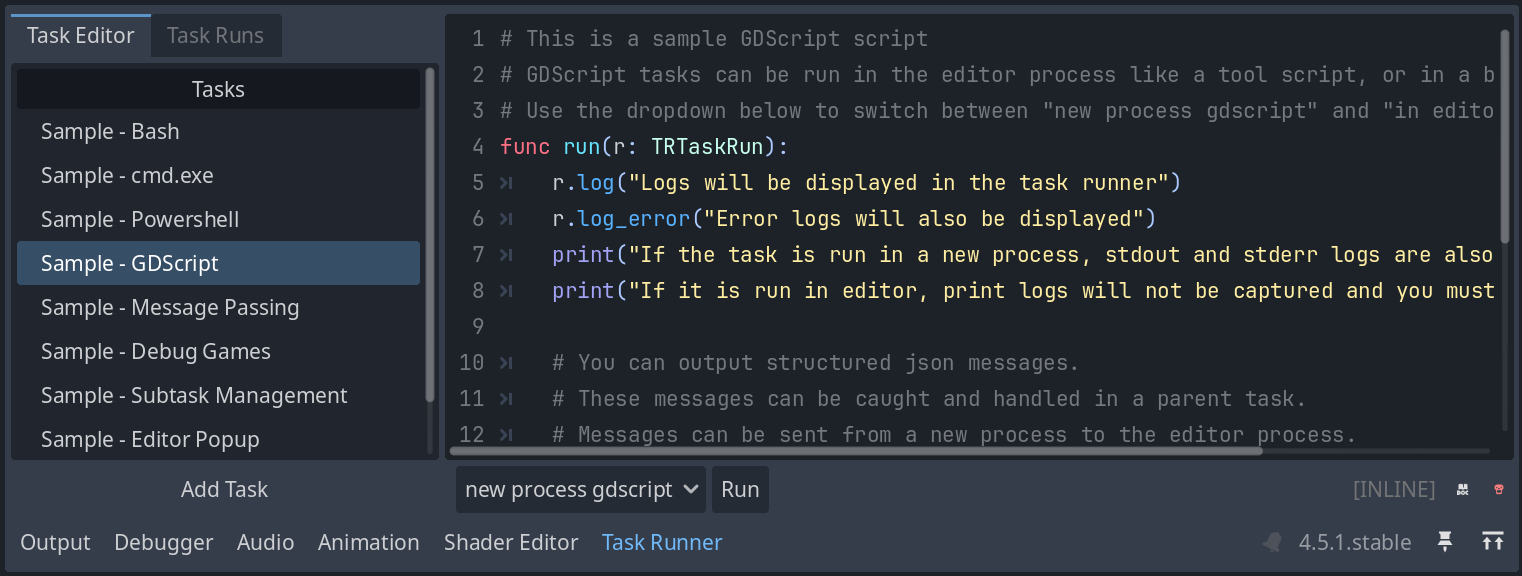
The Task Runner lets you write, save, and run scripts inside of the Godot Editor. Specifically, it adds a new dock to the bottom of the editor with two tabs - one is a list of tasks, and one is a list of task runs.
You write a script in the first tab, then hit run and review the results in the second tab. You can run as many scripts as you want in parallel, and scripts are saved as part of your project. We also have some cool advanced features for composing scripts together, but more on that later.
Scripts can be written in several languages - GDScript, Bash, Powershell, and Batch (the language used by cmd.exe). Bash is meant to be used on Linux, and Powershell and Batch are there for Windows users.
GDScript is the more interesting one. Because the language is part of Godot itself, it’s portable to everywhere the Editor can run. When working on the Multiplayer Toolkit, we initially wrote all our scripts in bash, but re-wrote them in GDScript when we realized it’s actually fairly ergonomic for build and deploy work.
Besides being an obvious choice for scripting in a Godot project, GDScript has another advantage. The Task Runner lets you run a GDScript task in a background process or in the currently running editor. Running a task in the current editor can be dangerous because you could break your editor, but it’s also quite powerful. You can use the EditorInterface class to automate just about any aspect of your project. Of course, you can do that from any old @tool script in godot, but we think it’s nice to have a dedicated panel to organize and store your utility scripts.
We’re particularly excited about use cases where you mix and match shell scripts with editor scripts. As an example, you could use a bash script to build and deploy your game to a server. Then, you could have a bash script establish an ssh tunnel to the server (ssh -R 6007:localhost:6007 your.remote.server.com) and connect your local debugger to the remotely running game. Godot’s an amazing engine, and it’s already possible to do things like this without the Task Runner, but we think it’s a very convenient way to encapsulate little automated flows like this.
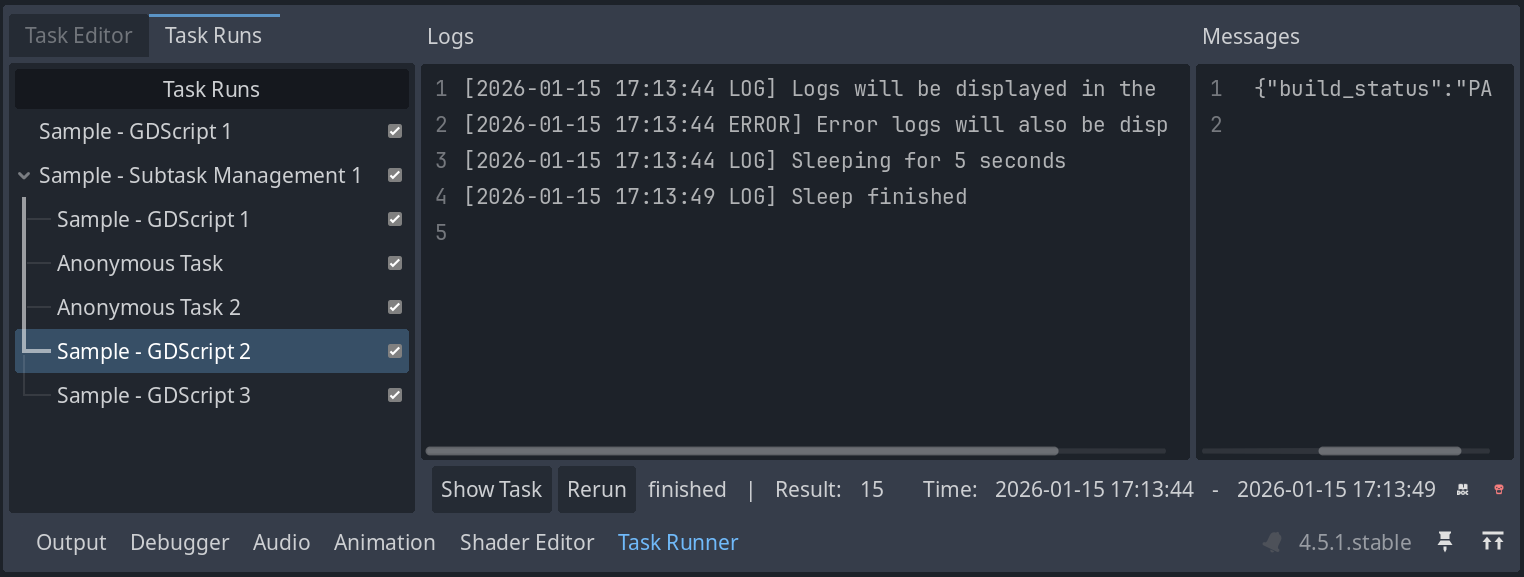
Let’s talk just a bit more about task composition. Say you have three scripts - a build script, a package script, and a deploy script. The build script exports your game. The package script moves some files around and zips them up. The deploy script copies your zip file to a remote host and unpacks it. You can create a fourth script - “Build, Package, Deploy” that calls the other three as subtasks.
Subtasks appear on the Task Runs tab as children of their parent run, making it easy to see which steps in a sequence have succeeded or failed. Subtasks are fairly flexible. You can run them in serial or in parallel, pass messages between them, and cancel them if needed. If you end up building more complex tasks, we think you’ll find subtasks quite useful!
Diving Deeper
To dive just a little deeper into the inner workings of the Task Runner, we’ll address the question: where are tasks stored on disk? There are two layers to this question.
First, the Task Runner keeps a list of tasks in your project.godot file. If you open the Project Settings window in Godot, you can actually see all your tasks listed there. We wouldn’t really recommend editing them that way, but you can.
Second, the actual body of the task can be stored either on disk (on disk tasks) or in the project.godot file (inline tasks). On disk tasks still have an entry in the project.godot file, but it’s just a name pointing to a file on disk.
It’s up to you how you want to organize your tasks. It’s convenient to just put all your tasks into the project.godot file, but this can produce a lot of version control churn and might make editing tasks somewhat harder.
You could make all your tasks on disk tasks, but then you have to make sure you don’t mess up the mapping between the file on disk and the entry in project.godot.
Our preferred approach is to use inline tasks by default, then move logic into an external file if it gets too long. For example, a build task could look like this:
func run(r: TRTaskRun) -> String:
	var builder = load("res://build_tools/builder.gd")
	return await builder.build()
We’ve seen a similar pattern of “entrypoint in project file, logic on disk” used in node.js’s package.json files, and it seems to work well.
Let’s say you’ve authored some build and deploy scripts using the Task Runner, and want to use them as part of your CI/CD pipeline. Is that possible? Of course! You can run any of your tasks from the command line like this:
godot --headless --script --no-header res://addons/TaskRunner/TaskRunnerCLI.gd -- --run-task="Build, Package, Deploy"We even clean up the output so it’s clear which subtask different log messages are coming from.
Final Thoughts
Of course, there’s always more to say about a tool like this. It’s easy to add support for new scripting languages. You can generate tasks programmatically. You can bubble up json messages from a child task to it’s parent task. But we’re going to stop ourselves here.
We’re very excited about this tool, and hope you are too. We hope you’ll find it to be a simple, versatile new part in your Godot arsenal. To whoever you are, good luck on whatever Godot project you’re hacking on next!
If you have any thoughts about the Task Runner, feel free to get in touch. We’d love to know what you end up using it for, what you like about it, and what could be better!
Rushdown-Studios
Work With Rushdown
If you're interested in working with Rushdown on your Godot (or other) projects, feel free to reach out! You can find us on LinkedIn here.